 Omnivorous Cat
Adding view counts to a pure front-end site, safely
Early on with this site, like I said in my first post, I don’t want to make the overall architecture any more complex than it needs to be. Fussing over architecture is the kind of thing that stalls easily, and you end up not writing anything at all. But even while keeping things this minimal, there are features I still want to try building, because they genuinely matter to me, and a view counter is one of them. So this post is about that: on a pure front-end site, how do we build a view counter, and build it safely. What follows is my current thinking and how I actually did it.
Deciding what to track traffic with
If you’re not going to compute visitor trails and all of that from scratch yourself, the most common and most usable tool right now is probably Google Analytics, the GA everyone knows. The way it works is you embed a piece of code Google gives you (these days it’s usually the so-called gtag, the Google tag) into your site; when someone visits, the corresponding traffic gets sent to Google, so it knows how many people came and which pages they hit.
For those of us who write blogs, this data answers very practical questions: which topics are popular, what people like to read. Personally I think that for most people who create things, understanding your readers, your audience, is important. Since there’s a ready-made, easy-to-use tool for it, I’ll naturally lean toward just using it, so for tracking traffic, my first choice is GA.
The front end can’t read it directly, but we can take a step back
GA has an open API that lets us pull the data back. The problem is that any credential you put in the browser is effectively public. And traffic is relatively private data; you don’t want to expose that kind of thing out in the open for anyone to go query.
So rather than forcing it to be real-time, it’s better to step back and ask two questions: can I tolerate this information being delayed? And what’s the main purpose of building this feature at all?
For me there are two purposes. First, to let readers see which posts people tend to read, so they can start with those. Second, to give them a rough sense of how many people have been to the site, so they have some baseline for how much to trust it. Neither of these needs the number to tick in real time. So my conclusion is that this information can be delayed. Even if the count a reader sees is a day behind, I don’t think that’s something I need to solve first.
If it can be delayed, then just refresh it periodically
Once you accept that it can be delayed, things get a lot simpler. We don’t need to go ask GA in real time every time someone opens a page; we just need to refresh one piece of data on a schedule.
And under that “refresh on a schedule” premise, the part that calls GA and pulls the data back doesn’t need to run inside the web page at all. We can let it run in the background on a schedule and write the result into a static piece of data. That data holds only the finished numbers, no credentials and no secrets, so even if it’s public there’s no leak to worry about. That’s the approach I ended up with.
This site runs on Cloudflare Pages
This site itself is built on Cloudflare Pages. If you’re interested in Cloudflare Pages, go read its official docs, or maybe I’ll write a post about it sometime since I’ve got a bunch of small tools hosted on it; basically as long as your domain is bought through Cloudflare, you get a fairly generous set of free features to use. Cloudflare Pages in particular I think is a great fit for hosting public sites.
One principle first, which runs through this whole post: every piece I use for this feature is deliberately chosen to run within a free tier. Because at the end of the day it’s just a small blog feature, and I don’t want it turning into something I pay to keep alive every month. As I bring up each service, I’ll mention its free-plan limits and how far my usage is from that line.
Getting through to the GA4 Data API
An automated flow can’t go through the interactive OAuth login, and the scope GA reading needs is in the range Google considers sensitive, so a shared client gets blocked. The right answer is to create a service account and hit the API with its key.
There’s an easy-to-miss point here: creating a service account in GCP doesn’t mean it can read your GA. GA’s access permissions and GCP’s IAM are two separate systems. You still have to go back to GA’s admin, to Property Access Management, and add that service account’s email as a Viewer. Without this step the API returns PERMISSION_DENIED, and the message won’t directly tell you this is the piece you missed.
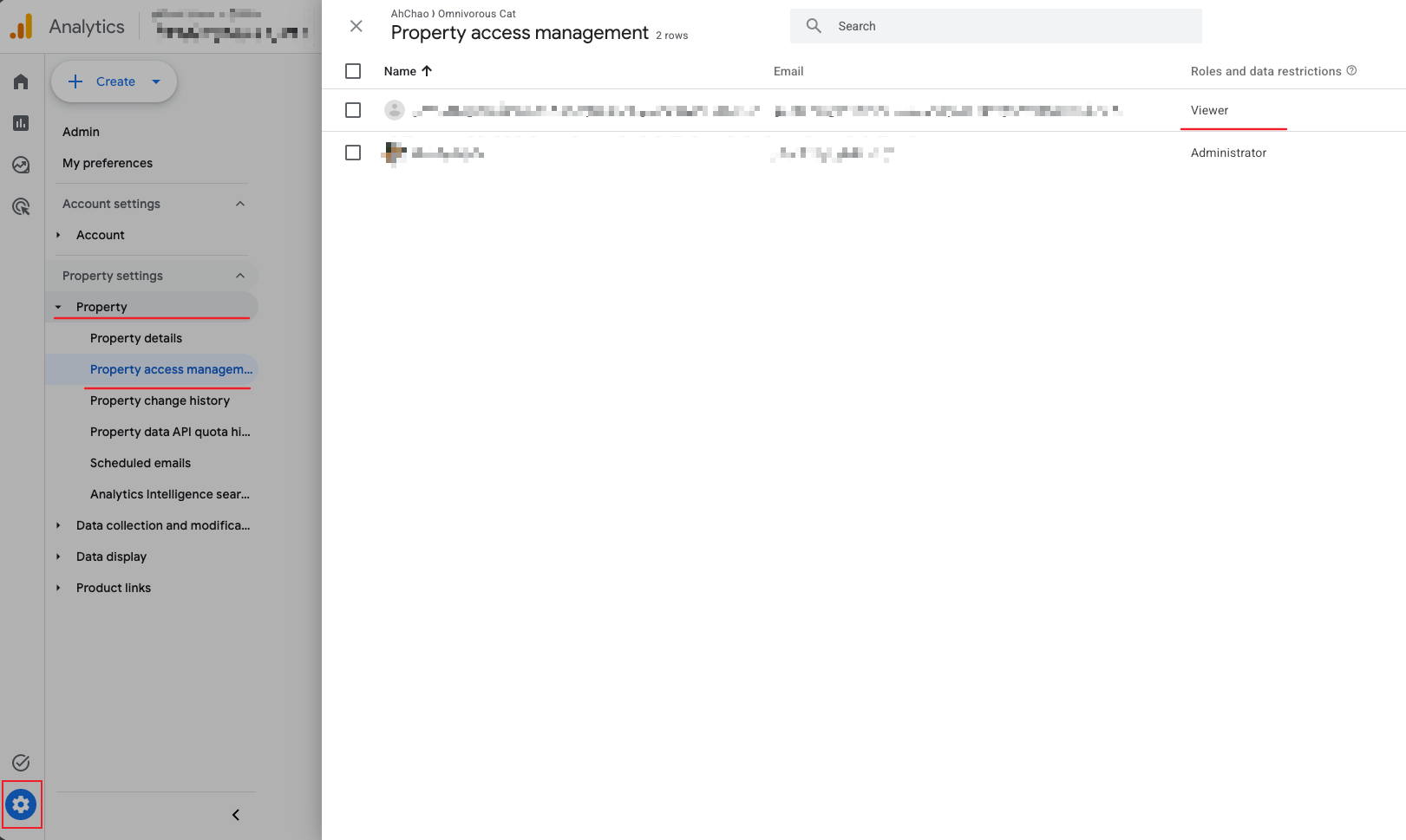
Also, the Data API uses the property’s numeric ID (you can find it in GA’s admin under Admin → Property Settings), not that G- prefixed Measurement ID. They’re two different things.
With the credential, pull a Report
With the credential in hand, the rest is just calling runReport. We pull two reports: one with the pagePath dimension, for the views of each page; one with no dimension, for the site-wide total.
const [byPage] = await client.runReport({
  property: `properties/YOUR_PROPERTY_ID`,
  dateRanges: [{ startDate: '2020-01-01', endDate: 'today' }],
  dimensions: [{ name: 'pagePath' }],
  metrics: [{ name: 'screenPageViews' }],
});
(In the Worker it’s actually a REST call to the same runReport endpoint; the request body is identical to the above, it just doesn’t go through this Node client.)
The pagePath GA returns is a path without the domain and without the query string. Normalize it to the URL format the site actually uses (adding a trailing slash and so on) and it lines up with each post. Once tidied up, it gets written into a stats.json that looks roughly like this:
{
  "generatedAt": "2026-07-19T...Z",
  "site": 65,
  "posts": { "/posts/some-post/": 42 }
}
Refreshing on a schedule, without losing the data
The most intuitive way to refresh on a schedule is to set up a job that runs at a fixed time each day. There are two things to watch here. One is the timing: schedule it for the early hours in the traffic source’s time zone, when the previous day’s data has usually finished processing. The other is data safety. If an update fails, it must not overwrite the perfectly good data that’s already there; when it fails, better to keep the previous old copy than to produce an empty, all-zeros file.
As for where this data lives and who updates it, at first I considered the laziest path: just have that daily job commit the finished file straight into the repo. But I quickly ruled that out. A commit every day would churn the blog’s whole commit history; and this thing is, at the end of the day, just a piece of statistic data that can be re-pulled from GA at any time, so there’s no need to leave a record in version control for it every single day. I want the repo for content, not for this kind of number that grows on its own.
So instead I put the data at a fixed path, have a background job refresh that path on a schedule, and the site just reads it, never touching git the whole way. On Cloudflare this happens to have two ready-made pieces: a Worker with a Cron Trigger (a bit of code that wakes up on a schedule each day to go fetch GA and compute the numbers), and KV as the place to store it.
What is KV
KV (Key-Value) is a very simple key-value store Cloudflare provides: you hand it a key and store a blob, and later the same key reads it back, fast, and distributed across nodes worldwide. It’s not made for complex relational queries, but for “one finished JSON, served to everyone” it’s just right.
In this feature, the Worker writes the computed numbers into KV each day under a fixed key, then exposes a path /stats.json; when someone reads it, it hands back that blob from KV. All the front end wants is to “go to /stats.json and grab the latest numbers”; when or by whom it was updated, the front end doesn’t need to know.
And this ties right back to the free principle from earlier. Cloudflare’s Worker free plan gives you a hundred thousand requests a day, with Cron Triggers available; the KV free plan is a hundred thousand reads a day, a thousand writes, and one GB of storage. My feature writes only once a day (that scheduled job) and reads only when someone opens a page, so the usage is nowhere near the ceiling. Add in that GA’s Data API is itself free and Cloudflare Pages is free, and the long-term cost of this view counter is, in effect, zero.
Permissions: where this kind of architecture gets stuck the most
For this kind of “wire many services together” feature, in my experience the thing that gets you stuck is usually not the program logic, but the permission boundary of each layer. They’re independent systems, and if any one layer isn’t opened up the whole chain doesn’t work, and the error message often won’t directly tell you which layer you missed. This one feature alone hit several:
- GA’s access and GCP’s IAM are two separate things. As mentioned, creating a service account in GCP doesn’t mean it can read your GA; you have to go back to GA’s admin and add it as a Viewer.
- The key has to be stored as a secret, and can’t go into version control. The service account’s key is a key that can read your data. It can only live in the deployment environment’s secrets (a Worker secret, for example), and should never show up in the repo or on the front end.
- Even the deploy tool’s own permissions are finely split. I got blocked once while creating the KV: the Cloudflare token I had could deploy a Worker but couldn’t create a KV, and returned a rather vague authentication error. It only went through after I added the matching permission.
Each of these is small on its own, but if you don’t confirm them one by one the feature just won’t run. So the way I see it now, on a similar service-chaining job, thinking through the permissions you need is the first layer of the architecture, worth working out up front before you start; and if something does go wrong, you’ll have a better handle on which specific piece it is.
Being able to pull it doesn’t mean you should show all of it
There’s also a decision about “what to show”. GA can give you quite a lot of data, but the one I care about most, and think is most useful to readers, is the view count; with that, the information I want to lay out is enough for me. The rest, even though GA can pull it all back, I don’t intend to spread all over the screen.
This is a technical tradeoff: when you decide to pull a piece of API data, you don’t need to, and shouldn’t, dump out everything it can give. How much you take and how much you show is itself part of the design. This applies not just to this feature; any program or architecture design is worth thinking through first.
This whole thing was actually built together with an AI
Worth mentioning here, since it’s tied to the “how” of this post: this whole thing, from using gcloud to get the GCP side (the service account, enabling the API) set up, to writing the fetching code, standing up the Worker, to deploying it live, was actually built by me together with an AI coding agent (Claude Code).
And my role in this collaboration is exactly the stuff earlier in this post: making decisions. Whether to use GA, whether the data can be delayed, whether to commit, which numbers to expose, what permission each layer needs. The “what to do, what not to do, and why” is mine; as for the “how”, turning ideas into running code, issuing the commands one by one, hitting walls and reporting back, that part goes to the agent, and it’s a lot faster.
I think this is the real change AI brings to this kind of “wire many services together” work. Wiring GA, gcloud, and Cloudflare together used to eat up half a day just reading docs and trial and error; now it becomes a conversation, where I do the judging and the deciding and the agent does the executing and verifying. Those pitfalls (permissions, propagation delay) are all still there, but the tedious stuff like docs and service configuration, AI does faster and better than a human, and what we need to do is make sure, through good process and permission control, that it doesn’t hold too much access, and that we understand what it’s doing well enough to know when to hit the brakes for it.
An agent amplifies execution, not judgment. It can pull a piece of API data back all at once and show all of it for you, but “should you do that” is still something you have to think through yourself. The code in this post doesn’t matter at all; maybe if you want to build this you just ask an AI, and the flow it writes fits your project better. What this post is trying to convey is the string of judgments in the middle, the “why” behind each decision. (And of course if someone does want to use it, I’m confident that if you hand the AI the links, it can help you build the setup you want with a flow close to this one; that’s one of the reasons for leaving the reference code.)
Wrapping up
There’s really no magic to the whole thing. At its core, it’s accepting that “this information can be delayed”, then taking a feature that would normally need to be real-time and need a backend, and reducing it to one static file refreshed on a schedule. What’s left to watch is just a few boundaries: the credential doesn’t reach the front end, a failed update doesn’t overwrite good data, and thinking through which numbers actually need to be shown. For a deliberately minimal, pure front-end site, this is how you add back a feature that would normally need a backend, without growing one.